
✅ Official WhatsApp
Send a template campaign
Send an approved template to your opted-in contacts.
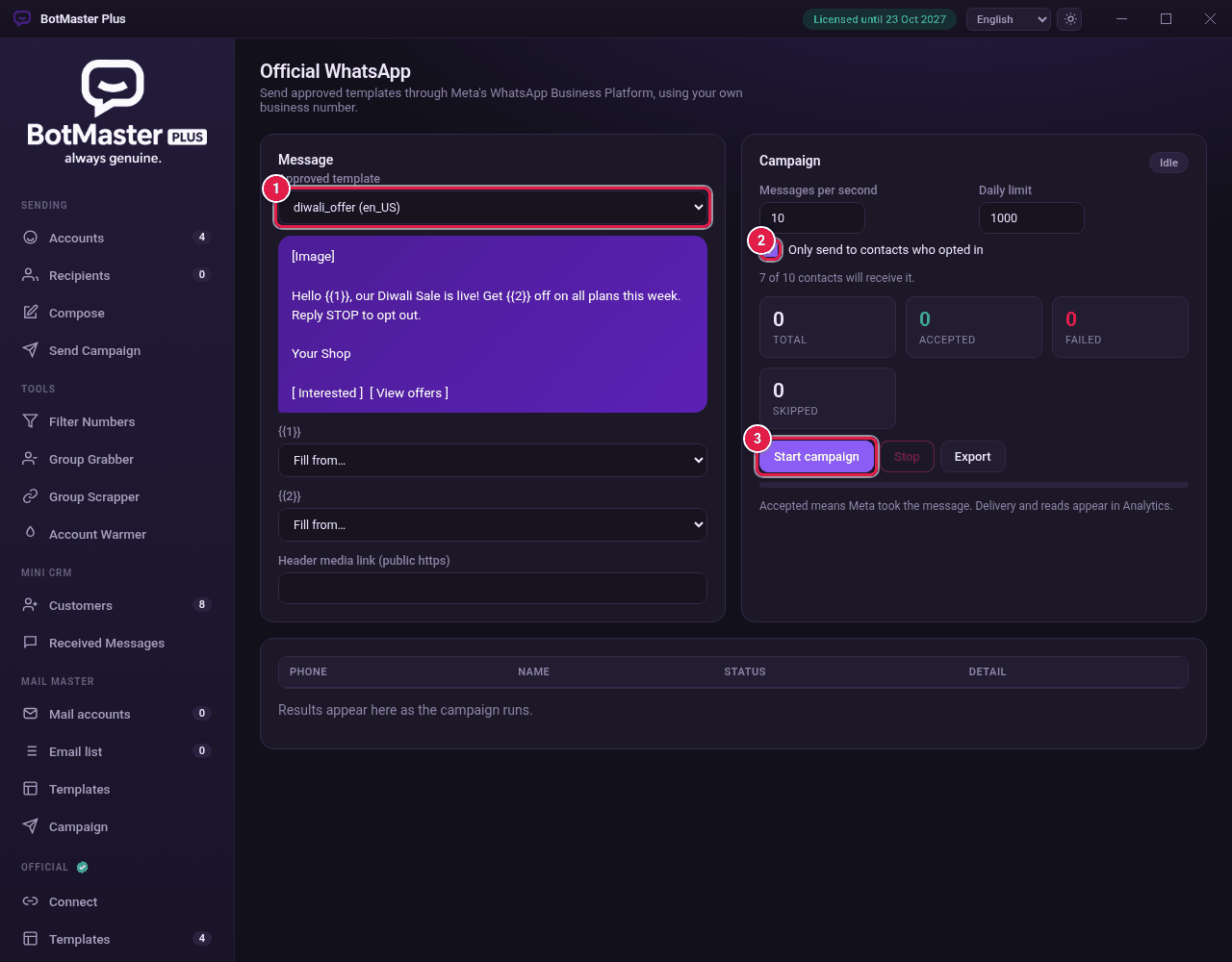
Set up the message
- Click Campaign under Official.
- In Approved template, choose the template.
- For each variable, such as {{1}}, choose a field in Fill from…: First name, Last name, Full name, Phone or Var 1 to Var 3.
- If the template has a picture or video header, paste its public https address in Header media link (public https).
Set the speed and send
- Set Messages per second and the Daily limit.
- Leave Only send to contacts who opted in ticked. The line below shows how many contacts will get it.
- Click Start campaign.
- Click Start campaign again to confirm. Meta charges per conversation.
Read the results
| Result | What it means |
|---|---|
| Accepted | Meta took the message. Delivery and reads show in Analytics. |
| Failed | Meta refused it. See the Detail column. |
| Skipped | Not sent, for example No opt-in, Opted out or Daily limit reached. |