
✅ Official WhatsApp
Make a new template
Write a template and send it to Meta for review. Approval usually takes from a few minutes to a day.
Write the template
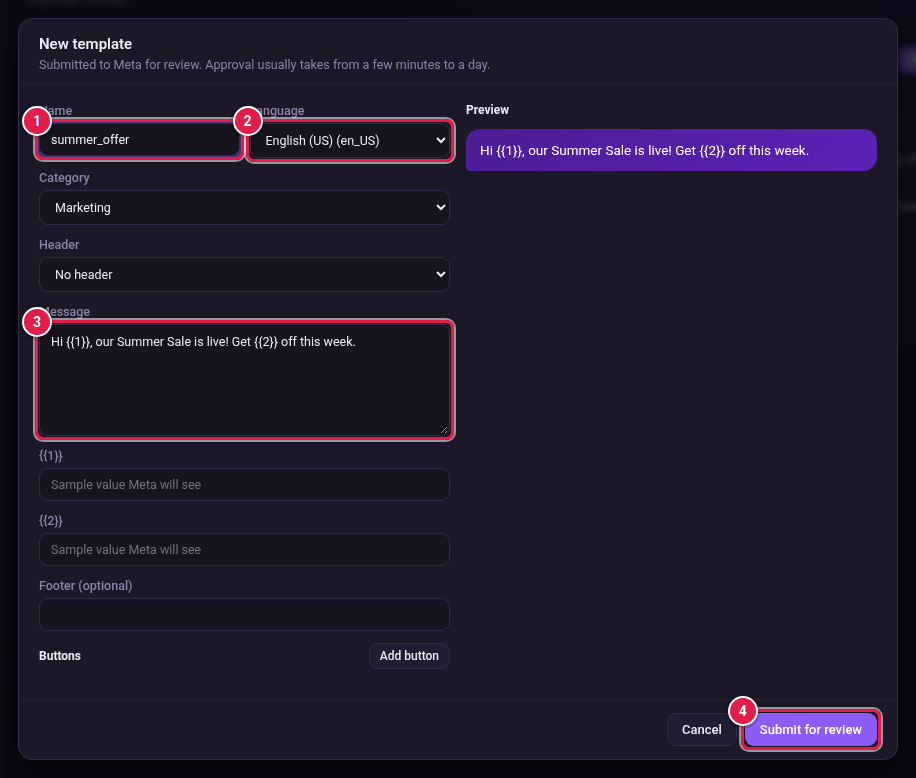
- On the Templates page, click New template.
- Type a Name. Use only lower-case letters, numbers and underscores, for example summer_offer.
- Choose the Language.
- Choose the Category: Marketing or Utility.
- Choose a Header: No header, Text, Image, Video or Document.
- Write the Message. Use {{1}}, {{2}} and so on for details that change for each person.
- Type a Sample value Meta will see for each variable.
- Type a Footer (optional).
- Click Add button to add buttons if you want.
- Check the Preview on the right.
- Click Submit for review.
Buttons you can add
| Button | What it does |
|---|---|
| Quick reply | Sends a short reply back to you. |
| Website link | Opens a web page. The address must start with https://. |
| Call number | Calls your phone number. |
| Copy code | Copies a code, such as a discount code. |