
📣 Messages & campaigns
Attach files and send a test
Add pictures, videos, documents or voice notes to your message, then send a test to yourself before the real campaign.
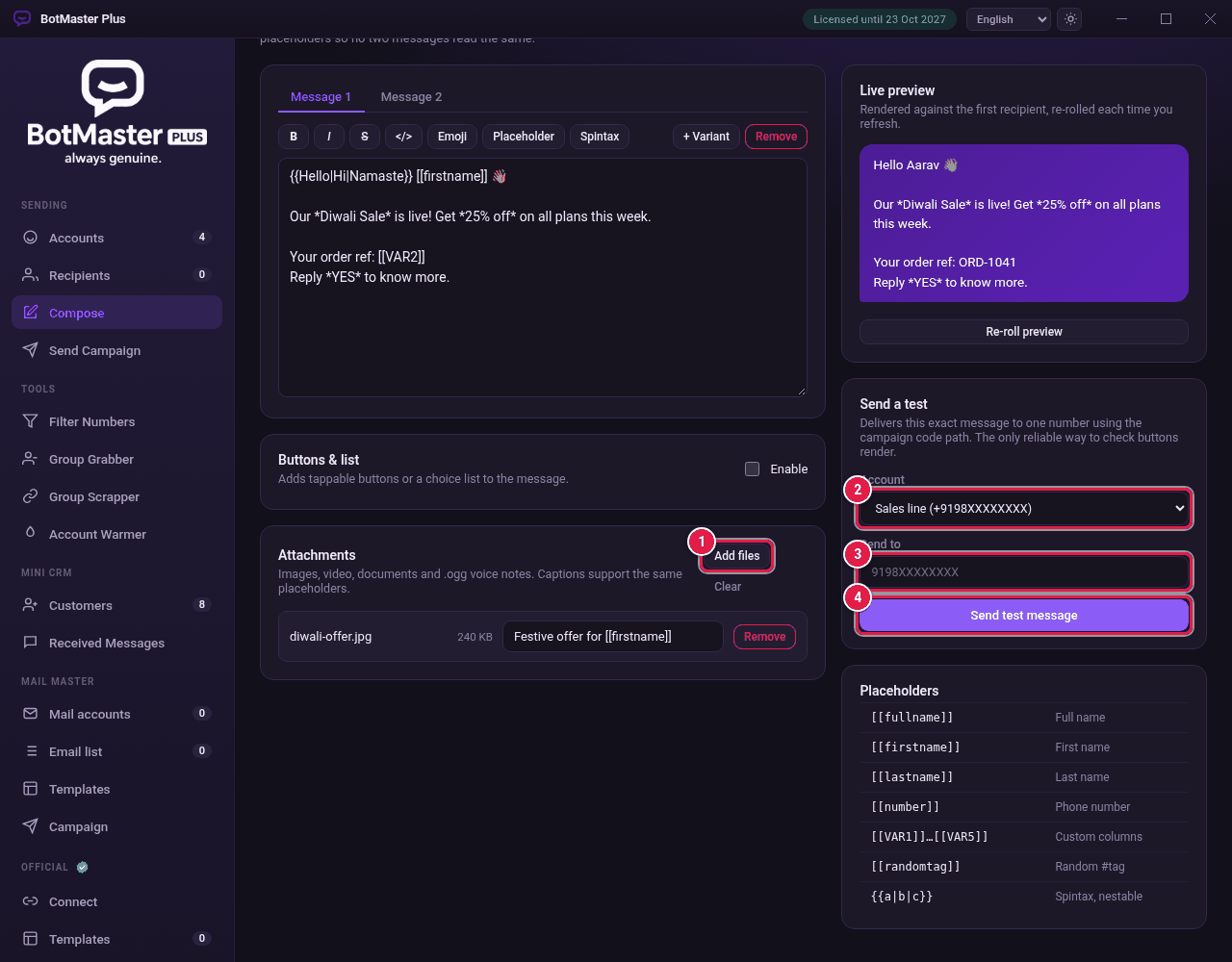
Attach files
- In Compose, find Attachments.
- Click Add files.
- Choose one or more files.
- Type a caption next to each file if you want. Captions can use placeholders such as [[firstname]].
- To delete a file, click Remove. To delete them all, click Clear.
| You can attach | Examples |
|---|---|
| Images | JPG, PNG, GIF, WEBP |
| Video | MP4, MOV, 3GP |
| Documents | PDF, Word, Excel, PowerPoint, TXT, CSV |
| Audio | MP3, M4A, WAV |
| Voice notes | .ogg or .opus files arrive as a voice note |
| Archives | ZIP, RAR, 7Z |
Send a test
- Find Send a test.
- In Account, choose the account to send from.
- In Send to, type your own number with the country code.
- Click Send test message.
- Check the message on your phone.