
✅ Official WhatsApp
Auto-reply for Official WhatsApp
Answer incoming messages automatically, even while your computer is off. Keyword rules are checked first, then the one-time welcome message, then AI.
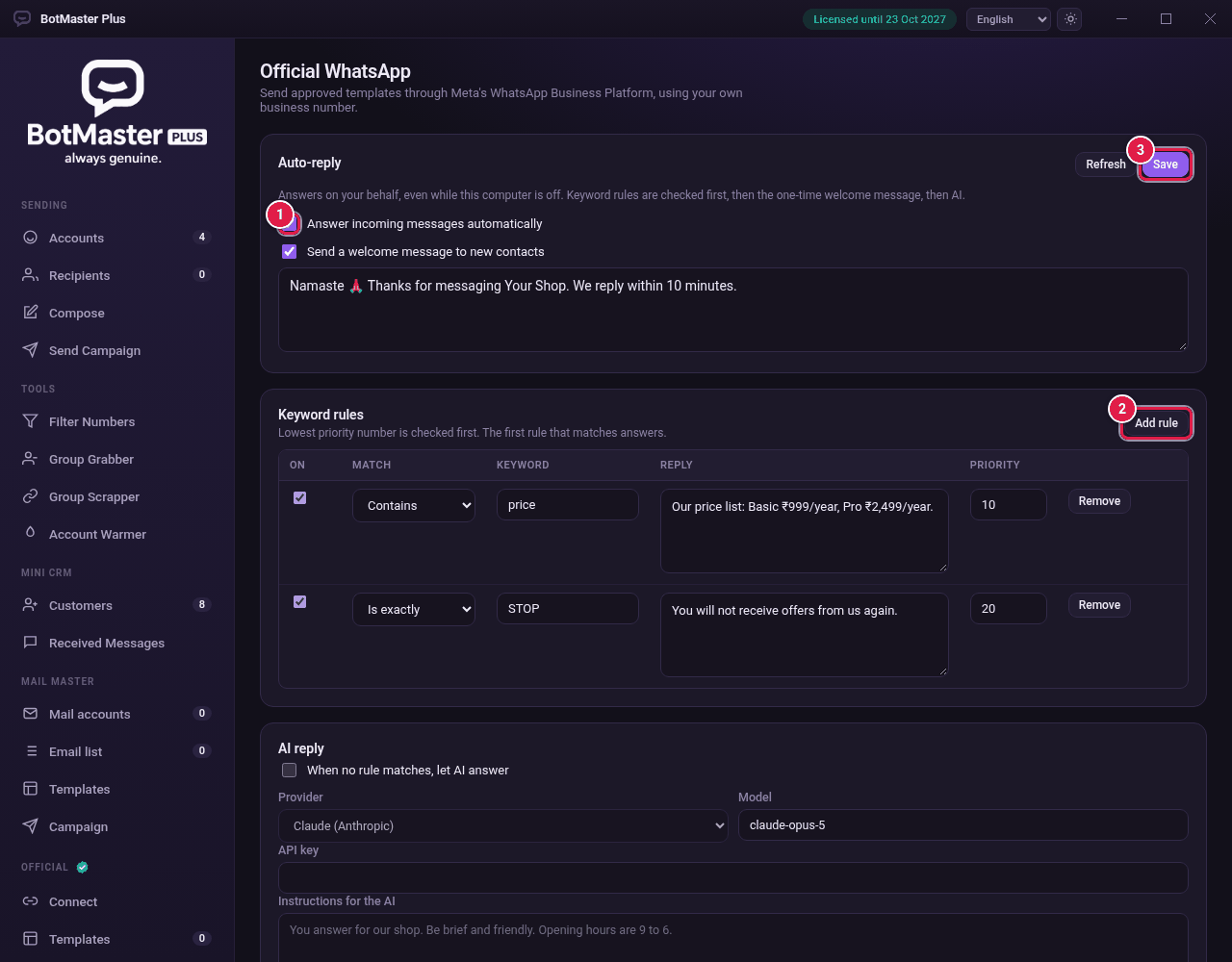
Turn it on
- Click Auto-reply under Official.
- Tick Answer incoming messages automatically.
- Tick Send a welcome message to new contacts and type the message.
Add keyword rules
- Click Add rule.
- In Match, choose Contains, Is exactly, Starts with or Ends with.
- Type the Keyword and the Reply.
- Set the Priority. The lowest number is checked first, and the first rule that matches answers.
- Make sure On is ticked.
- Click Save.
Let AI answer the rest
- Under AI reply, tick When no rule matches, let AI answer.
- Choose the Provider and Model.
- Paste your API key.
- Write the Instructions for the AI, for example "You answer for our shop. Be brief and friendly. Opening hours are 9 to 6."
- Set Messages of history to include and Longest answer (tokens) if you want.
- Click Save.